Tuesday, 2 September 2014

How to configure Central User Administration (CUA)

Here is the procedure for Central user administration configuration in a landscape:

1. Create Logical systems to all clients for the landscape using BD54 or SALE as
   comfortable.

2. Attach Logical system to clients using same.

3. Create RFC connection to relevant systems with the same name as logical system name.

If you Logical system name is SIDCLNT100 for dev then create RFC connection to
DEV with same name SIDCLNT100.

4. Let us suppose you Central system: DEVCLNT100
Child system: QUACLNT200

5. Create user CUA_DEV_100 in devclnt100 system

4. Create user CUA_QUA_200 in quaclnt200 system.

Create RFC’s to child systems from central and central to child.

5. Now logon to central system and execute tcode SCUA to configure CUA.

Enter the name of the distribution model: CUA

Press create

Enter ALL Child system RFC’s

Save your entries now result screen will appear

If you expand the nodes for

the individual systems, you normally see the following messages for

each system: .ALE distribution model was saved,. .Central User

Administration activated and Text comparison was started.. 

If problem messages are displayed here, follow the procedure in SAP Note 333441:

6. Setting the Parameters for Field Distribution

Enter Tcode SCUM in central system following screen will appear

Now maintain your filed distribution and save it.

You can use transaction SUCOMP to administer company address data.

You can use transaction SCUG in the central system to perform the 
synchronization activities 

between the central system and the child systems by selecting your child system on the initial

screen of transaction SCUG and then choosing Synchronize Company Addresses in the 

CentralSystem

After you have synchronized the company addresses, you can transfer the users from the newly 

connected child systems to central administration.

This is done, as with the synchronization of the company addresses, using

transaction SCUG in the central system. To do this, on the initial screen of

transaction SCUG, select your child system and choose the Copy Users to

the Central System button.


Use:

You can use the report RSCCUSND from the central system of Central User Administration (CUA) to synchronize the master data of selected users with a child system of the CUA. The report sends the master data (including role and profile assignments) to a child system of the CUA.
If master data exists in the child system for the user sent, it is overwritten.

Procedure:

1. Start report RSCCUSND (for example, using transaction SA38).
2. In the Receiving System field, specify the child system to which you want
    to send the user data.
3. You can use the fields User and User Group to restrict the number of users.
4. Specify the data that you want to distribute under Distribution Options.
5. Choose Execute.

SAPPFPAR : tools to check SAP Server profile

SAP kernel has a little part called sappfpar. This little program is used to check whether your SAP profile has already well configured or not. It will suggest gave you a suggestion if there are any of your set parameter on SAP profile is not fit or not good enough.

To run this command, you need to log on as adm user.

Syntax :
adm$sappfpar check pf=/directory_where_profile_reside/profile_to_check
Here are the sample :
host:adm 6> sappfpar check pf=/sapmnt/profile/_DVEBMGS10_host
================================================================================
Checking profile: /sapmnt//profile/_DVEBMGS10_host
================================================================================
Shared memory disposition overview
===============================================================
Shared memory pools
Key: 10 Pool
Size configured.....: 188000000 ( 179.3 MB)
Size min. estimated.: 185403586 ( 176.8 MB)
Advised Size........: 188000000 ( 179.3 MB)

Key: 40 Pool for database buffers
Size configured.....: 126000000 ( 120.2 MB)
Size min. estimated.: 122104088 ( 116.4 MB)
Advised Size........: 126000000 ( 120.2 MB)

Shared memories inside of pool 10
Key: 11 Size: 500000 ( 0.5 MB) Factory calender buffer
Key: 12 Size: 6000000 ( 5.7 MB) TemSe Char-Code convert Buf.
Key: 13 Size: 40500000 ( 38.6 MB) Alert Area
Key: 14 Size: 20000000 ( 19.1 MB) Presentation buffer
Key: 17 Size: 2672386 ( 2.5 MB) Roll administration
Key: 30 Size: 20480 ( 0.0 MB) Taskhandler runtime admin.
Key: 33 Size: 30720000 ( 29.3 MB) Table buffer, part.buffering
Key: 34 Size: 10240000 ( 9.8 MB) Enqueue table
Key: 51 Size: 3200000 ( 3.1 MB) Extended memory admin.
Key: 54 Size: 20488192 ( 19.5 MB) Export/Import buffer
Key: 55 Size: 8192 ( 0.0 MB) Spool local printer+joblist
Key: 57 Size: 1048576 ( 1.0 MB) Profilparameter in shared mem
Key: 58 Size: 4096 ( 0.0 MB) Enqueue ID for reset

Shared memories inside of pool 40
Key: 42 Size: 10752992 ( 10.3 MB) DB TTAB buffer
Key: 43 Size: 33414392 ( 31.9 MB) DB FTAB buffer
Key: 44 Size: 8838392 ( 8.4 MB) DB IREC buffer
Key: 45 Size: 5766392 ( 5.5 MB) DB short nametab buffer
Key: 46 Size: 20480 ( 0.0 MB) DB sync table
Key: 47 Size: 10241024 ( 9.8 MB) DB CUA buffer
Key: 48 Size: 300000 ( 0.3 MB) Number range buffer
Key: 49 Size: 2769392 ( 2.6 MB) Spool admin (SpoolWP+DiaWP)

Shared memories outside of pools
Key: 1 Size: 2500 ( 0.0 MB) System administration
Key: 2 Size: 33600808 ( 32.0 MB) Disp. administration tables
Key: 3 Size: 114048000 ( 108.8 MB) Disp. communication areas
Key: 4 Size: 513448 ( 0.5 MB) statistic area
Key: 6 Size: 638976000 ( 609.4 MB) ABAP program buffer
Key: 7 Size: 14838 ( 0.0 MB) Update task administration
Key: 8 Size: 134217828 ( 128.0 MB) Paging buffer
Key: 9 Size: 134217828 ( 128.0 MB) Roll buffer
Key: 16 Size: 22400 ( 0.0 MB) Semaphore activity monitoring
Key: 18 Size: 917604 ( 0.9 MB) Paging adminitration
Key: 19 Size: 50000000 ( 47.7 MB) Table-buffer
Key: 31 Size: 4806000 ( 4.6 MB) Dispatcher request queue
Key: 41 Size: 25010000 ( 23.9 MB) DB statistics buffer
Key: 52 Size: 40000 ( 0.0 MB) Message Server buffer
Key: 62 Size: 85983232 ( 82.0 MB) Memory pipes
Key: 63 Size: 409600 ( 0.4 MB) ICMAN shared memory
Key: 64 Size: 4202496 ( 4.0 MB) Online Text Repository Buf.
Key: 65 Size: 4202496 ( 4.0 MB) Export/Import Shared Memory
Key: 1002 Size: 400000 ( 0.4 MB) Performance monitoring V01.0
Key: 58900110 Size: 4096 ( 0.0 MB) SCSA area

Nr of operating system shared memory segments: 22

Shared memory resource requirements estimated
===============================================================
Nr of shared memory descriptors required for
Extended Memory Management (unnamed mapped file).: 8

Total Nr of shared segments required.....: 30
System-imposed number of shared memories.: 1000
Shared memory segment size required min..: 638976000 ( 609.4 MB)
System-imposed maximum segment size......: 35184372088832 (33554432.0 MB)

Swap space requirements estimated
================================================
Shared memory....................: 1475.9 MB
..in pool 10 176.8 MB, 98% used
..in pool 40 116.4 MB, 96% used
..not in pool: 1174.5 MB
Processes........................: 228.8 MB
Extended Memory .................: 4092.0 MB
------------------------------------------------
Total, minimum requirement.......: 5796.7 MB
Process local heaps, worst case..: 1907.3 MB
Total, worst case requirement....: 7704.0 MB

Errors detected..................: 0
Warnings detected................: 0
If any errors and Warnings, it will display
Errors detected..................: 1
Warnings detected................: 1


How to update using SPAM,SAINT

Importing a SPAM/SAINT Update

Use: A SPAM/SAINT Update (SPAM update for short) contains updates and improvements to Support Package Manager and Add-On Installation Tool. There is always one SPAM update for each release.

The latest SPAM update is also available in SAP Support Portal, under service.sap.com/spManager.

Make sure you always have the most recent version of SPAM update before importing Support Packages or Installation Packages.

Prerequisites
You can only import a SPAM update if there are no terminated packages in the system.

A dialog box informs you if there are any terminated packages. You then have two options:

● Import the entire queue to begin with and then the SPAM update.

● Delete the queue, import the SPAM update, then import the queue.

You can only delete the queue if module Import 1 has not yet started (up to phase SCHEDULE_RDDIMPDP).

Procedure
1. Call Support Package Manager (transaction SPAM).

2. Check if the SPAM update offered is newer than the one in your system.

3. To import the most recent SPAM update, choose Support Package ® Import SPAM update.

SPAM updates are automatically confirmed once they have been imported.


Friday, 29 August 2014

Execute OS command from SAP GUI


To perform tasks more efficiently, Basis administrator can execute operating system command directly from SAP GUI. Instead of logging into the operating system to run the OS command.

The common TCODE to run the OS command: SA38 and SM69

Option 1: TCODE: SA38

1. Enter "RSBDCOS0" in the program option
2. Enter the OS command to be execute.
3. The OS command that been executed.


Option 2: TCODE: SM69
1. Select the OS command to be execute and click the "execute" button
2. Enter the OS command parameter and click the "execute" button.
3. Results of the OS command.


Code to enable the edit option for parameter change (RZ11)


The update option to perform parameter change with TCODE: RZ11 is not available by default.

Steps on how to re-activate the hidden edit option.

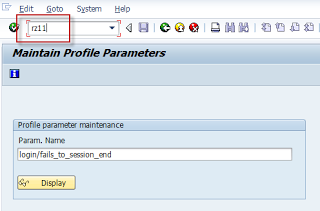
1. Execute TCODE: RZ11


2. The editable option for parameter change is not available
 
3. Enter "int" to enable the hidden edit button
 
4.The "edit" option appear for parameter change
5. Perform the changes and click save to update the new parameter value.


Note 1597355 - Swap-space recommandation for Linux


Symptom

You want to setup a SAP system on Linux and evaluate the amount of swap-space that is sufficient for your system.

Other Terms

Linux, Swap, swap space, swap-space, swap-space recommendation, paging, swapping

Reason and Prerequisites

Linux provides a special paging functionality to evict and reclaim memory pages of applications from the physical memory (RAM) to a dedicated area on a secondary storage (i. e. a disk). This functionality is called swap and the secondary storage area is referred to as swap-space. The Linux swap functionality can improve the overall system performance and system reliability. Not frequently used memory can be temporally moved to the swap-space and frees up physical memory that can be used for other purposes, i. e. page-cache. Furthermore it can prevent an out-of-memory situation, when a system runs out of physical memory. In this case Linux starts evicting memory-pages from the physical memory to the swap-space until it can serve all memory allocation requests from applications. The Linux swap-functionality is available on all Linux systems supported by SAP.

The swap functionality requires enough space on a secondary storage, typically a partition on a disk or a file on a filesystem.

Solution

SAP recommends to use an amount of swap-space based on the table illustrated below. Customers may decide to use more or less swap-space based on their individual system configuration and their own experience during the day-to-day usage of a system.

Physical Memory (RAM) Recommended Swap-Space

< 32 GByte 2 x RAM

32 - 63         GByte 64 GByte
64 - 127       GByte 96 GByte
128 - 255     GByte 128 GByte
256 - 511     GByte 160 GByte
512 - 1023   GByte 192 GByte
1024 - 2047 GByte 224 GByte
2048 - 4095 GByte 256 GByte
4096 - 8191 GByte 288 GByte

> 8192 GByte 320 GByte

When running SAP systems, the use of Linux swap-space is mandatory. SAP recommends to setup a dedicated swap-partition on a fast storage, like a system internal HDD, RAID-Array, SSD or a LUN in a SAN.

In the past, SAP recommended to use a swap-space with a size of two times the amount of physical memory (RAM). For systems with up to 32 GByte RAM, this recommendation remains valid. For systems with more than 32 GByte RAM, the amount of swap-space in proportion to the physical memory can be reduced. This non-linear swap-space recommendation has several reasons:

Systems running SAP with more than 32 GByte RAM (64 GByte swap-space) are usually not able to efficiently use the high amount of swap-space without running into a performance degradation. The reasons is, that a swap-space area on a disk is usually much slower than the physical RAM. Upon a certain swap-space usage, the swap-in and swap-out I/O activity may seriously slowdown or even completely freeze a system. A high swap-usage and increased disk I/O activity indicates that a system is already in an unhealthy state. This is slightly depending on the SAP workload (SAP system and database). Appropriate steps by the System-Administration have to be initiated in any case in order to secure the operation of the system.

Swap-space areas are typically stored on partitions resisting on local disks. Huge amount of disk-space for the exclusive swap-space usage can be quite expensive on systems with large amounts of memory. Many blade servers do not have enough slots to provide sufficient disk-space capacity. Furthermore, modern servers are often equipped with smaller Solid-State Drives, that doesn't provide enough disk capacity for large swap-space partitions.

Overview of the Linux swap mechanism (2.6.x based kernel versions)

During normal operation a Linux system tries to keep all application data in physical memory. Linux uses swap-space to store inactive memory pages, evicted from the systems physical memory, in order to free up physical memory capacity. The operation of evicting memory pages from the physical memory to the swap-space is called "swap-out". The operation of restoring pages from the swap-space into the physical memory is called "swap-in". The swap-space is a memory area on an external device, typically a partition on a harddisk or a file on a filesystem. It is usually much slower than the physical RAM. Linux can use several swap-space locations in parallel and merges all swap-space locations together to one large swap-space area. Memory pages that are swapped-out into the swap-space, free up physical memory that can be re-used for other purposes. Swap-space is not a full-qualified extension to the physical RAM, because it is not possible to read or modify swapped-out memory pages directly. Instead, swapped-out memory pages have to be read back into the physical memory when an application tries to access these memory pages again.

Linux swap-space extends the physical memory in the way, that it is used to store inactive memory pages, which are evicted from the physical memory in favor of active memory pages or even memory pages from the page-cache. According to that, Linux may prefer a bigger page-cache over least used memory pages of an application. If a system runs out of physical memory, Linux evicts as many inactive memory pages as needed from the physical memory into the swap-space in order to be able to fulfill all memory allocation requests from applications. If a system runs out of physical memory and out of swap-space, the OOM killer (out of memory killer) starts to kill processes based on a selection-algorithm in order to free up memory and to keep a system alive.

Reasons for swapping out physical memory to the swap-space

Linux starts to evict memory pages from the physical memory to the swap-space under certain conditions:

Memory pressure: If Linux runs out of physical memory, e. g. if an applications allocates more memory than it is physically available, Linux starts to swap-out memory pages to the swap-space to free-up physical memory. Before that happens, it will try to shrink its caches, like the page-cache, buffer-cache and slab-cache.

Large amount of inactive memory and a growing page-cache: If the RAM contains a lot of inactive memory pages from applications (for example SAP shared memory areas) and a growing page-cache fills up the remaining memory, Linux may decide to page-out some or all of the inactive memory pages into the swap-space. This behavior improves the overall-performance in many cases, but may also lead into performance problems under some circumstances. More details about this behavior are explained in the SAP Note #1557506

Description of the Linux swap mechanism


The Linux kernel 2.6 uses the kswapd daemon thread for swap operations. Additionally a direct-memory reclaim path exists, bypassing the kswapd, when a system gets under heavy memory pressure that can not be solved by the kswapd anymore. Kswapd only evicts pages from the physical memory that are marked as inactive. The kernel scans memory areas in all memory zones and decides, based on a LRU (least recently used) and a balance algorithm, whether a scanned memory page gets active or inactive. The more memory pressure exists, the higher is the probability for a memory page to get marked as inactive. Not all inactive memory pages are swapped-out immediately. Another algorithm decides how much of the inactive memory is required to be swapped-out to the swap-space. The kswapd is invoked by the Linux memory allocator if the available free memory of a zone gets below a certain value.

In opposite of swap-out, the swap-in mechanism restores a page from the swap-space into the physical memory. This is being done, if a process tries to access a memory page in the virtual memory address space, that is currently not resident in the physical RAM, a so called page-fault. After a page has been read back into the physical memory, it is not being deleted immediately from the swap space. Instead, the page-table information of this page is stored in the Swap-Cache. If this recently restored memory page has to be swapped-out again and has not been modified in the meanwhile, it is still identical with the already existing copy in the swap-space. In this case, the systems decides, based on the information stored in the swap-cache, that this page can just be removed from the physical memory without having the need to do an expensive disk write operation.

The difference between paging and swapping


In Linux, the operation that moves a memory page from the physical memory (RAM) to a secondary device (e. g. a disk) is called page-out. The operation of reading a memory-page from a secondary device into the physical memory is called page-in. This does not only include the eviction of memory pages from the physical memory to the swap-space and reading it back into the physical memory. For example, it also includes the synchronization of dirty memory pages stored in the page-cache with their counterparts on the disk. Swap-space read and write operations are referred to as swap-in and swap-out.

Header Data

Released On
01.07.2011 14:29:11
Release Status
Released for Customer
Component
BC-OP-LNX Linux
Other Components
BC-OP-LNX-OLNX Oracle Linux
BC-OP-LNX-RH Red Hat Linux
BC-OP-LNX-SUSE SUSE Linux

Priority
Recommendations / Additional Info
Category
Performance


Validity

This document is not restricted to a software component or software component version


References

This document refers to:

SAP Notes

1647204
BYD: Database is stopped due to insufficient memory
171356
SAP software on Linux: General information

This document is referenced by:

SAP Notes (3)

171356
SAP software on Linux: General information
1647204
BYD: Database is stopped due to insufficient memory
1944799
SAP HANA Guidelines for SLES Operating System Installation


How to Monitor SAP Systems

 
This document is intended for all persons who are responsible to monitor Production Systems in SAP.
Check SAP Process Overview SM51/ SM50

System Wide Work Process Overview SM66
Users Logged On AL08/ SM04
Spool Requests SP01

Check SAP Locks SM12

Check for Updates SM13

Check System Log SM21

Check Background Jobs SM37

SAP Buffers ST02

Workload Analysis ST03

Operating System Monitor ST06

ABAP Dump Analysis ST22

Database Analysis ST04

Check Database Performance DB02

Check E-Mail and Fax Messages SOST

Check for failed IDOCs WE02/ WE05